70 Lumen Trionic LED Rear Lights (pair)

This manual both shows how you attach the rear light and the light on a Walker (left column below) and also how you attach them on a Trionic Veloped (right column below).

In the left-hand photo, A shows the 10-degree angled strap for attaching the lights on a Trionic Walker. B shows the 0-degree angled strap for attaching the lights on a Trionic Veloped.

B shows the 0-degree angled strap for attaching the lights on a Veloped.

70 Lumen Trionic LED Rear Lights

Attaching the LED Lights

Instructions for a Walker

Of the two rubber straps included, choose the one with a 10-degree angled light attachment section.
A1. Of the two rubber straps included, choose the one with a 10-degree angled light attachment section.
Push the light into the slot of the strap until it snaps in place.
A2. Push the light into the slot of the strap until it snaps in place.
Attach the light to the Walker, either on the semi-vertical frame tube just below the height adjustment quick-release lever, or on the black semi-vertical grip tube. Pull the strap tight and fix it with the plastic hook.
A3. Attach the light to the Walker, either on the semi-vertical frame tube just below the height adjustment quick-release lever, or on the black semi-vertical grip tube. Pull the strap tight and fix it with the plastic hook.
Pull the strap tight and fix it with the plastic hook.
A4. Pull the strap tight and fix it with the plastic hook.

Instructions for a Trionic Veloped

Of the two rubber straps included, choose the one with a 0-degree angled light attachment section.
B1. Of the two rubber straps included, choose the one with a 0-degree angled light attachment section.
Push the light into the slaot of the strap until it snaps in place.
B2. Push the light into the slaot of the strap until it snaps in place.
Attach the lights to the Trionic Veloped, preferably on the two rear vertical frame tubes, below the height-adjustment quick-release levers. Pull the strap tight and fix it with the plastic hook.
B3. Attach the lights to the Trionic Veloped, preferably on the two rear vertical frame tubes, below the height-adjustment quick-release levers. Pull the strap tight and fix it with the plastic hook.
Pull the strap tight and fix it with the plastic hook.
B4. Pull the strap tight and fix it with the plastic hook.

Instructions for Use

The package contains

Caution

It is normal for the battery to reach a high temperature (up to 104°F / 40°C) during charging due to chemical reactions within the battery. The battery may also become warm if it is not fully drained before charging.

Several factors can affect the battery's lifespan, including the type of cell, usage strain, maintenance routine, temperature, and the number of charge cycles. Generally, a higher battery capacity results in a longer operation time.

The battery capacity may decrease to approximately 80% of its original capacity after 300–500 charge/discharge cycles. With proper care, the battery can have a lifespan of up to 3 years.

Water resistant is for rain water only. Do not submerge the bat- tery or the whole light into water when cleaning. Clean the light with a soft damp cloth when needed."

Battery Performance

Battery performance is significantly affected by temperature variations:

Low Temperature: At 0°C, capacity decreases by 5–10%, reducing operation time by 50%. At -20°C, capacity drops by 30%, potentially shortening operation time by 70%. Performance returns to normal when the temperature rises to 20°C.

Self-Discharge Rate: At room temperature, the battery loses about 1% of its capacity per day. When stored at 40°C, the self-discharge rate increases, leading to a loss of approximately 5% of capacity per day.

To maintain optimal battery performance, avoid exposing it to extreme temperatures and store it in a cool, dry place.

If you do not use the battery for a long time be sure to recharge the battery every 3 months.

How to charge the battery

  1. Find the charging place at the bottom of the light.
  2. Lift the rubber cover to access the charging port.
  3. Plug the USB-cable into your USB-charger.
  4. Plug the charging cable into the light's charging port.
  5. The indicator shows red during charging.

The charging indicator turns green when fully charged.

Attention: Use the original supplied USB-cable to charge the battery. Unplug the charging cable once the battery is fully charged.
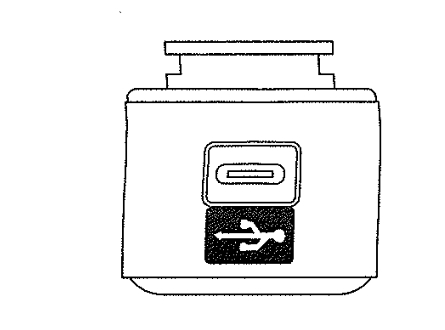
How to charge the battery

How to operate the light

Press and hold the switch for 2 seconds to turn the light on or off. Click once to cycle through modes.

Safe Mode

When the battery is low, the light will automatically switch to a 5-lumen steady mode, providing an additional 30 minutes of operation.

Product Reviews    

  • Brilliant!…

    I have MND and walking has become more difficult - mainly due to the worry of tripping and balance. Since I have had the walker, I have been able to enjoy going for walks again and can walk much faster with the walker for support. The walker is so …

  • Easy rider…

    Sir, since the purchase of the above walker my wife has found she has less bother getting around, and no back and shoulder pain, after a days shopping. Glides easily over imperfections in footways and footpaths. I can not express how happy it makes m…

  • The Veloped 14er is now my travelling companion…

    The Veloped 14er arrived this afternoon! I immediately trained my circulation on a 2 km excursion; the upper handle height adjustment fits my needs perfectly. The excellent documentation on the website made it very easy to set up the order.

    I am 9…

  • BRILLIANT MACHINE AND EXCELLENT SERVICE…

    I emailed Stefan in Sweden to ask various questions about the Veloped. He phoned me back and he couldn't have been more helpful. He was able to match the price of a UK supplier, who offered the Veloped VAT free for people with a registered disability…

  • Being clearly visible is about safety…

    The rear lights can be easily seen from a distance and significantly increase safety in the darkness. Time will tell whether the stretchy fastening tape will hold up well in the long term.…

  • So, so happy…

    I am so happy with my veloped, it's made walking so much easier. I enjoy being in the countryside , in the woods and tracks. With the usual walker with four corner wheels I found it difficult with stones and roots and branches but the veloped just gl…

  • Veloped…

    Very good aid for walking…

  • Worth Every Penny - Best "Walker" on the Market…

    I had been looking for a walker with larger, rubber tube tires forever it seemed. The small, hard, plastic tires on all walkers are only good for very short distances on even surfaces. Then I saw this product and I chatted and spoke to the company …

  • Richard…

    Thank you for sending the back cushion for my new Veloped. It fits perfectly between the brake levers and provides much-needed comfort when sitting on the lower back.

    At this early stage, I am thrilled with how my Veloped makes walking more access…

Subscribe to our newsletter!

"> ?>