200 Lumen Trionic LED Front Light

This manual both shows how you attach the LED light on a Walker (left column below) and also how you attach it on a Veloped (right column below).

In the left-hand photo, A shows the holder attachment parts for a Walker (2 screws + 2 washers). B shows the holder attachment parts for a Veloped (1 screw + 1 knurled nut + 1 nut).

200 Lumen Trionic LED Front Light

Attaching the Light Holder

Instructions for a Walker

Of the two rubber straps included,choose the one with a 10-degree angled light attachment section.
A1. Of the two rubber straps included,choose the one with a 10-degree angled light attachment section.
Push the light into the slot of the strap until it snaps in place.
A2. Push the light into the slot of the strap until it snaps in place.
Attach the light to the Walker, either on the semi-vertical frame tube just below the height adjustment quick-release lever, or on the black semi-vertical grip tube.
A3. Attach the light to the Walker, either on the semi-vertical frame tube just below the height adjustment quick-release lever, or on the black semi-vertical grip tube.
Pull the strap tight and fix it with the plastic hook.
A4. Pull the strap tight and fix it with the plastic hook.

Instructions for a Veloped

Of the two rubber straps included, choose the one with a 0-degree angled light attachment section.
A1. Of the two rubber straps included, choose the one with a 0-degree angled light attachment section.
Push the light into the slot of the strap until it snaps in place.
B2. Push the light into the slot of the strap until it snaps in place.
Attach the light to the Veloped, preferably the right or left of the hinge on the U-shaped grip bar. Pull the strap tight and fix it with the plastic hook.
B3. Attach the light to the Veloped, preferably the right or left of the hinge on the U-shaped grip bar. Pull the strap tight and fix it with the plastic hook.
Pull the strap tight and fix it with the plastic hook.
B4. Pull the strap tight and fix it with the plastic hook.

Instructions for Use

The package contains

Caution

It is normal for the battery to reach a high temperature (up to 104°F / 40°C) during charging due to chemical reactions within the battery. The battery may also become warm if it is not fully drained before charging.

Several factors can affect the battery's lifespan, including the type of cell, usage strain, maintenance routine, temperature, and the number of charge cycles. Generally, a higher battery capacity results in a longer operation time.

The battery capacity may decrease to approximately 80% of its original capacity after 300–500 charge/discharge cycles. With proper care, the battery can have a lifespan of up to 3 years.

Water resistant is for rain water only. Do not submerge the bat- tery or the whole light into water when cleaning. Clean the light with a soft damp cloth when needed.

Battery Performance

Battery performance is significantly affected by temperature variations:

Low Temperature: At 0°C, capacity decreases by 5–10%, reducing operation time by 50%. At -20°C, capacity drops by 30%, potentially shortening operation time by 70%. Performance returns to normal when the temperature rises to 20°C.

Self-Discharge Rate: At room temperature, the battery loses about 1% of its capacity per day. When stored at 40°C, the self-discharge rate increases, leading to a loss of approximately 5% of capacity per day.

To maintain optimal battery performance, avoid exposing it to extreme temperatures and store it in a cool, dry place.

If you do not use the battery for a long time be sure to recharge the battery every 3 months.

How to charge the battery

  1. Find the charging place at the bottom of the light.
  2. Lift the rubber cover to access the charging port.
  3. Plug the USB-cable into your USB-charger.
  4. Plug the charging cable into the light's charging port.
  5. The indicator shows red during charging.

The charging indicator turns green when fully charged.

Attention: Use the original supplied USB-cable to charge the battery. Unplug the charging cable once the battery is fully charged.
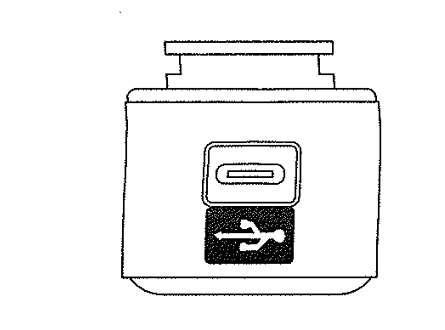
How to charge the battery

How to operate the light

Press and hold the switch for 2 seconds to turn the light on or off. Click once to cycle through modes.

Safe Mode

When the battery is low, the light will automatically switch to a 5-lumen steady mode, providing an additional 30 minutes of operation.

Product Reviews    

  • Getting back into the garden…

    The Veloped Trek has allowed me to get back into the garden, see the plants, even prune an overgrown bush, hang out washing (exciting) and just experience my large backyard again.

    MS limits me in many ways, so the ability to safely walk on grass …

  • A rollator that gives security…

    I use my wife's Walker 14er in addition to the rollator I have owned for years. The stable construction and large wheels of the Walker 14er give a completely different walking feeling, a new sense of safety. The bumpy cobblestones and uneven terrain …

  • My Veloped has improved my quality of life unbelievably!…

    Probably a little too early for a full review yet as I have only had my 14” medium nearly two weeks but already it has accompanied me on a two day mountain First Aid Course at Plas-y-Brenin in North Wales where it behaved impeccably clambering over b…

  • Veloped Trek for Snowdon!…

    I recently purchased my first Veloped and it has helped immensely in improving my fitness and mental health by getting me outdoors more often. I have Parkinson’s disease and am getting fit ready to walk up Snowdon with it in a few months time for cha…

  • Brian…

    I’m 69. Sadly, cancer attacked my spine. I lost the ability to walk, had lots of treatment at Clatterbridge Liverpool, and then home physiotherapist visits. I’m now walking slowly.

    Had several walkers, none worked for me, but this one, on the cont…

  • Heavy but incredible advantage everywhere in the city and on ALL paths.…

    My mother (87) is happy. Thanks to pneumatic tyres and big wheels, she can finally take part in city life again. Other (usual) walkers had caused severe pain in her shoulder.…

  • provides quality of life…

    It is excellent, a reliable companion that improves quality of life.…

  • I have found the Trionic Walker excellent…

    I have found the Trionic Walker excellent, as I have numb fingers tips, I am able to collapse the handle down with the clip locks, which has helped in keeping my independence.

    Well done, Lads. I hope you keep going strong with your Walkers.

    I h…

  • Buying a ROLLATOR…

    Did a brochure request which arrived promptly from Sweden - why can’t local companies manage this!

    Realised I would be a questionable size in terms of fitting their machines. So I rang and got through almost immediately and had an extremely inform…

Subscribe to our newsletter!