200 Lumen Trionic LED Front Light

This manual both shows how you attach the LED light on a Walker (left column below) and also how you attach it on a Veloped (right column below).

In the left-hand photo, A shows the holder attachment parts for a Walker (2 screws + 2 washers). B shows the holder attachment parts for a Veloped (1 screw + 1 knurled nut + 1 nut).

200 Lumen Trionic LED Front Light

Attaching the Light Holder

Instructions for a Walker

Of the two rubber straps included,choose the one with a 10-degree angled light attachment section.
A1. Of the two rubber straps included,choose the one with a 10-degree angled light attachment section.
Push the light into the slot of the strap until it snaps in place.
A2. Push the light into the slot of the strap until it snaps in place.
Attach the light to the Walker, either on the semi-vertical frame tube just below the height adjustment quick-release lever, or on the black semi-vertical grip tube.
A3. Attach the light to the Walker, either on the semi-vertical frame tube just below the height adjustment quick-release lever, or on the black semi-vertical grip tube.
Pull the strap tight and fix it with the plastic hook.
A4. Pull the strap tight and fix it with the plastic hook.

Instructions for a Veloped

Of the two rubber straps included, choose the one with a 0-degree angled light attachment section.
A1. Of the two rubber straps included, choose the one with a 0-degree angled light attachment section.
Push the light into the slot of the strap until it snaps in place.
B2. Push the light into the slot of the strap until it snaps in place.
Attach the light to the Veloped, preferably the right or left of the hinge on the U-shaped grip bar. Pull the strap tight and fix it with the plastic hook.
B3. Attach the light to the Veloped, preferably the right or left of the hinge on the U-shaped grip bar. Pull the strap tight and fix it with the plastic hook.
Pull the strap tight and fix it with the plastic hook.
B4. Pull the strap tight and fix it with the plastic hook.

Instructions for Use

The package contains

Caution

It is normal for the battery to reach a high temperature (up to 104°F / 40°C) during charging due to chemical reactions within the battery. The battery may also become warm if it is not fully drained before charging.

Several factors can affect the battery's lifespan, including the type of cell, usage strain, maintenance routine, temperature, and the number of charge cycles. Generally, a higher battery capacity results in a longer operation time.

The battery capacity may decrease to approximately 80% of its original capacity after 300–500 charge/discharge cycles. With proper care, the battery can have a lifespan of up to 3 years.

Water resistant is for rain water only. Do not submerge the bat- tery or the whole light into water when cleaning. Clean the light with a soft damp cloth when needed.

Battery Performance

Battery performance is significantly affected by temperature variations:

Low Temperature: At 0°C, capacity decreases by 5–10%, reducing operation time by 50%. At -20°C, capacity drops by 30%, potentially shortening operation time by 70%. Performance returns to normal when the temperature rises to 20°C.

Self-Discharge Rate: At room temperature, the battery loses about 1% of its capacity per day. When stored at 40°C, the self-discharge rate increases, leading to a loss of approximately 5% of capacity per day.

To maintain optimal battery performance, avoid exposing it to extreme temperatures and store it in a cool, dry place.

If you do not use the battery for a long time be sure to recharge the battery every 3 months.

How to charge the battery

  1. Find the charging place at the bottom of the light.
  2. Lift the rubber cover to access the charging port.
  3. Plug the USB-cable into your USB-charger.
  4. Plug the charging cable into the light's charging port.
  5. The indicator shows red during charging.

The charging indicator turns green when fully charged.

Attention: Use the original supplied USB-cable to charge the battery. Unplug the charging cable once the battery is fully charged.
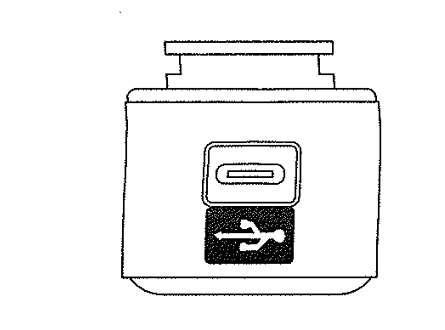
How to charge the battery

How to operate the light

Press and hold the switch for 2 seconds to turn the light on or off. Click once to cycle through modes.

Safe Mode

When the battery is low, the light will automatically switch to a 5-lumen steady mode, providing an additional 30 minutes of operation.

Product Reviews    

  • Brilliant walker…

    Can’t believe that this walker has made such a difference to my life. I can walk over uneven ground, cobblestone paths and rough ground without needing to push any harder than on even terrain, thus avoiding painful arms and shoulders. The walker is r…

  • S U P E R !…

    The shipping and the delivery of our Veloped Trek M 14er was completed in 3 days!
    So, it was very fast!

    Our Veloped was carefully packed and, when we unpacked it, was not damaged! We did not have any problems with the assembly either! See video a…

  • Robust innovative products…

    Good products, long life, sturdy and durable. Good design features.…

  • Veloped bag…

    I bought a bag to be able to take my beloved on aero planes. The bag is big and I will need help but it is good quality and will mean I can take my Veloped abroad. Customer service was very efficient.…

    Veloped Transport Bag
    by Janet Wilde
  • The best walker I've ever found.…

    My Walker is a high-quality product, which is very well thought out and easy to handle. Its robust appearance makes it seem very heavy, yet the opposite is true and one notices then that the construction is made of aluminium and is therefore very lig…

  • Walker 12…

    I bought the Veloped Tour 1.5 years ago and I'm very happy with it. The only problem was that the trunk of our car was too small. So I bought a travel rollator (it's not that expensive). We went to the North Sea and the travel rollator didn't meet my…

  • New lease on life…

    My Veloped has given me a new lease on life! It’s so much safer and easier than using my walker, and allows me to navigate all kinds of terrain too, including trails. I feel comfortable being more independent and also never worry about getting stuck …

  • A rollator for life…

    A rollator for life. I found it for my daughter. It's called Walker 14 and it's impressive, big tires, not wheels!
    The one that circumnavigates all cliffs, came to my mind immediately.
    But it also has room for all that solidity and precise tinkerin…

  • "No more sitting around watching life go by"

    Wow my Dad has recently bought a Trionic Veloped All Terrain Walker Rollator, no more sitting around watching the family having fun,he's joining in on the walks, shopping trips,and even started having holidays again,(that makes Mum happy!!),they've b…

Subscribe to our newsletter!

"> ?>